
Track petitions data in Google Tag Manager (GTM)
Global Project Standards
It’s also extremely important to insert campaign standards on your pages. This will allow us to track global campaigns and will help you to analyse your local performance.
Planet 4
The values defined in the Analytics & Tracking fields settings are sent to Google Analytics as custom dimensions. Check the Google Tag Manager instructions below to understand how we can capture this information from the Planet 4 DataLayer and translate them into custom dimensions.
There are two types of information that you need to define on the Planet 4 backend. Check the instructions below to understand why they are important and where you can set them up.
Analytics & Tracking
The data standards for Projects should be defined on the page level. You will find a box on the right side of your editor panel called “Analytics & Tracking”. The dropdown fields are automatically populated from the 2019 Global Standards. These values will help us to categorize campaigns and keep real-time tracking of our engagement actions around the world.
Technically speaking, the values defined in those fields are sent to Google Analytics as custom dimensions. Check the Google Tag Manager instructions below to understand how we can capture this information from the Planet 4 DataLayer and translate them into custom dimensions.
Follow the steps below to track Global Project’s outputs in Planet 4:
(1) Create a new content in Planet 4 (post, campaign, page).
(2) Select a Global Project in the first dropdown field of the Analytics & Tracking settings

(3) Verify if your page views and events are being tracked with the Global Projects Standards. You can check the custom dimensions in Google Analytics.
Important: When a Global Project is closed, the value is removed from the GP Global Projects Standards (SSOT) table. This won’t affect the attribution on existing pages. The only difference is that the editor will see the value with a [Deprecated] label on the backend.
External Systems
To track petition signups and pageviews in external systems – such as Engaging Networks, Hubspot, etc – with the Global Project Standards, please follow the instructions here.
Tracking Petition Signups
The event tracking for Petition Signup is based on dataLayer.push events. Please follow the Google Tag Manager technical setup instructions for each platform.
Planet 4
Define settings in Planet 4 WordPress
A) Goal Field – This value should be defined on the EN Form Block backend. This will help us to categorize the events and understand what is the purpose of the form (e.g. petition signup, action alert, contact form, etc).
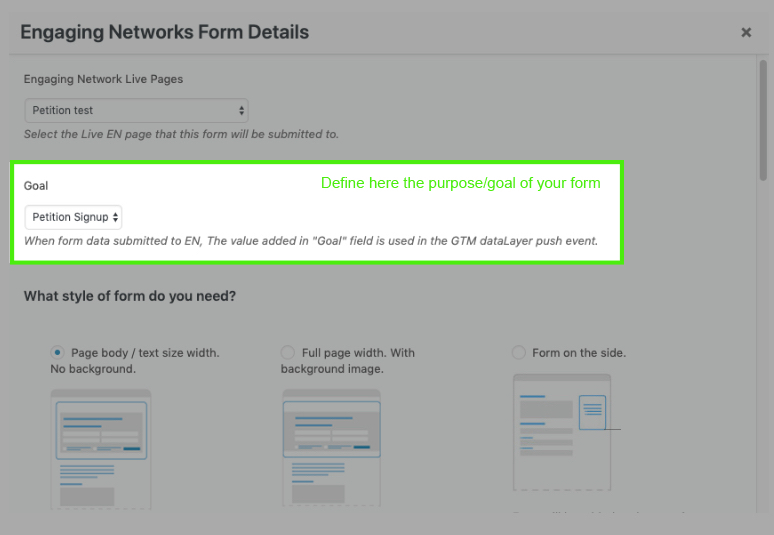
B) Analytics & Tracking – This fields are used for the Global Project Standards. Check the instructions on the section above.
Create the setup in Google Tag Manager
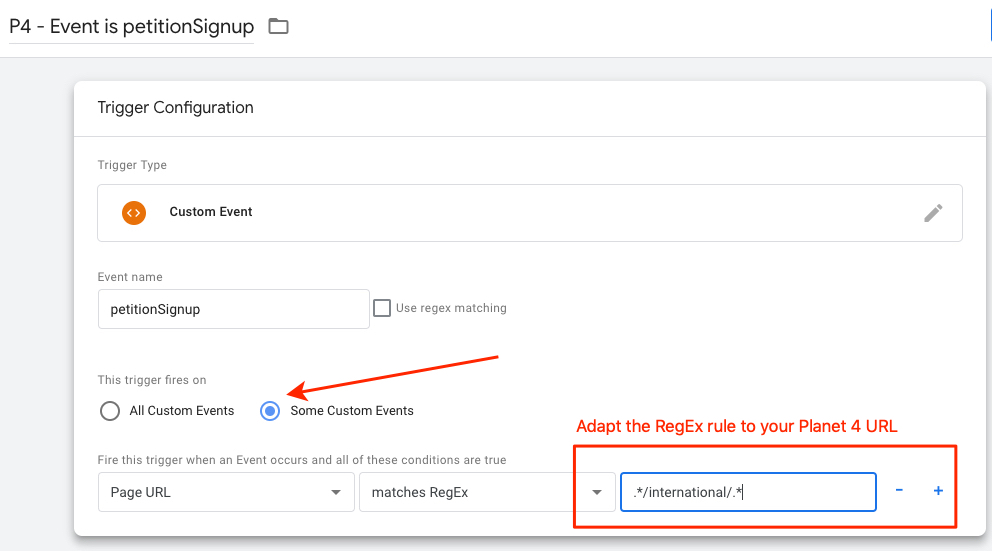
(1) Create a trigger called “P4 – Event is petitionSignup”
(2) Fire this trigger only on Some Custom Events: when PAGE URL matches Regex .*/international/.*
(3) Create a new Universal Analytics event tag called "P4 - UA Event - Form Submissions"
Follow the setup below and connect it to your Google Analytics Settings variable:
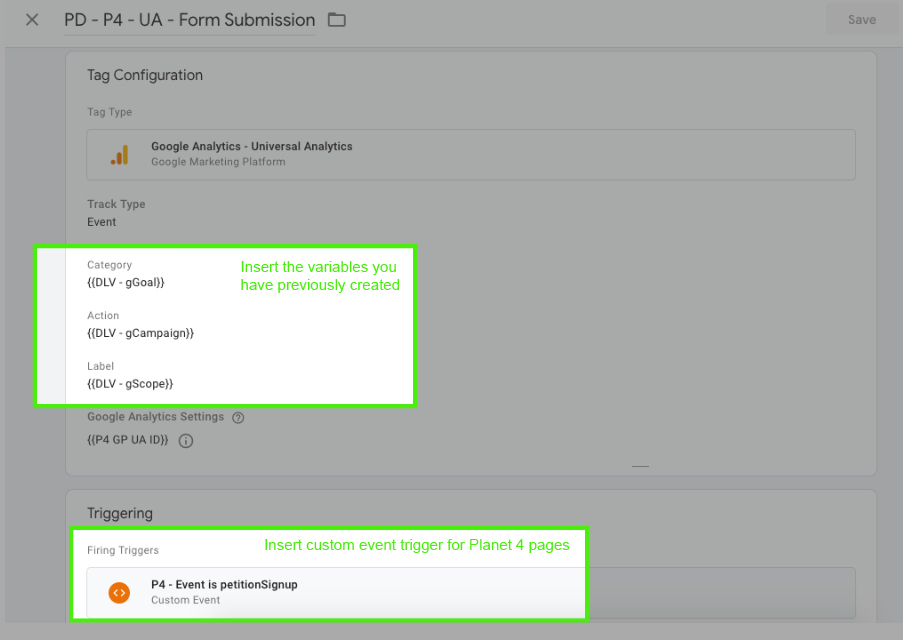
Resume of the “PD – P4 – UA – Form Submissions”:
- Category =
gGoal Action =gCampaignLabel =gScope
External Systems
For tracking Petition Signups in external systems – such as Engaging Networks, Hubspot, etc – please follow the instructions below:
Please, follow the updated Global Property instructions for event tracking
Please, use the 2020 Global Project Standards for the campaign values.